Wednesday, 25 April 2012

5th Entry

Assalamualaikum...
waaa.... i think its been quite long i have not posting anything :0..This is because the class keep being postponed so, i have nothing to write :(
oK lets proceed to our main topic. So the topic for this week is....

CABLING 

What is network cabling?
Cable is the medium through which information usually moves. In some cases, a network will utilize only one type of cable, other networks will use a variety of cable types. The type of cable chosen for a network is related to the network's topology, protocol, and size.

Type of cable
  •  Unshielded Twisted Pair (UTP) Cable
  •  Shielded Twisted Pair (STP) Cable
  •  Coaxial Cable
  •  Fiber Optic Cable
  •  Wireless LANs    
Unshielded Twisted Pair Cable (UTP)
>> has four pairs of wires inside the jacket.
>> Each pair is twisted with a different number of twists per  inch to help eliminate interference from adjacent   pairs and other electrical devices.
>>The tighter the twisting, the higher the supported transmission rate and the greater the cost per foot.
>>Disadvantage: may be susceptible to radio & electrical frequency interference.
Unshielded twisted pair

Types of UTP
 
Category
Speed
Use
1
1 Mbps
Voice Only (Telephone Wire)
2
4 Mbps
LocalTalk & Telephone (Rarely used)
3
16 Mbps
10BaseT Ethernet
4
20 Mbps
Token Ring (Rarely used)
5
100 Mbps (2 pair)
1000 Mbps (4 pair)
100BaseT Ethernet
Gigabit Ethernet
5e
1,000 Mbps
Gigabit Ethernet
6
10,000 Mbps
Gigabit Ethernet
                                                                                                                                                             
UTP Connector
>>The standard connector for UTP = RJ-45 connector.
>> plastic connector that looks like a large telephone-style connector.
>>A slot allows the RJ-45 to be inserted only one way.This standard designates which wire goes with each pin inside the connector.  
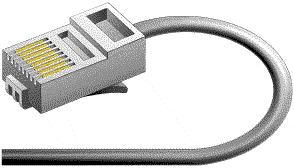
RJ-45 Connector
  Shielded Twisted Pair Cable (STP)
>>consist of 2 individual wires.

>>suitable in environments with lots of potential interference or in extremely sensitive environments that may be susceptible to the electrical current in the UTP.
>>Shielded cables can also help to extend the maximum distance of the cables.

>>Shielded twisted pair cable is available in three different configurations:
  1. Each pair of wires is individually shielded with foil.
  2. There is a foil or braid shield inside the jacket covering all wires (as a group).
  3. There is a shield around each individual pair, as well as around the entire group of wires (referred to as double shield twisted pair). 
Coaxial Cable  
>>has a single copper conductor at its center. 
>>A plastic layer provides insulation between the center conductor and a braided metal shield. 
>>The metal shield helps to block any outside interference from fluorescent lights, motors, and other computers.
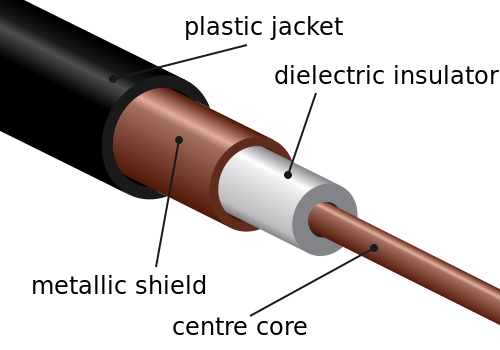
coaxial cable
 Coaxial Cable Connector
>>most common type of connector= Bayone-Neill-Concelman (BNC) connector.
>>Different types of adapters are available for BNC connectors:
  • T-connector
  • barrel connector
  • terminator.
>>Connectors on the cable are the weakest points in any network. To help avoid problems, always use the BNC connectors that crimp, rather screw, onto the cable.
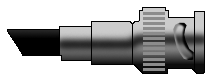
a BNC Connector


Fibre Optic Cable
>> consists of a center glass core surrounded by several layers of protective materials.
>>transmits light rather than electronic signals eliminating the problem of electrical interference.
>>ideal for certain environments that contain a large amount of electrical interference.
>>the standard for connecting networks between buildings, due to its immunity to the effects of moisture and lighting.
>>transmit signals over much longer distances than coaxial and twisted pair.
>>carry information at vastly greater speeds.
>>more difficult to install and modify.
 

two common types of fiber cables

                                            *single mode                        *Multimode
                                 provide more distance                   larger diameter
                                 more expensive                                     
                          #both cables provide high bandwidth at high speeds.

 
fibre optic cable
                               
                                   summary of ethernet cabling

Specification

Cable Type
10BaseT
Unshielded Twisted Pair
10Base2
Thin Coaxial
10Base5
Thick Coaxial
100BaseT
Unshielded Twisted Pair
100BaseFX
Fiber Optic
100BaseBX
Single mode Fiber
100BaseSX
Multimode Fiber
1000BaseT
Unshielded Twisted Pair
1000BaseFX
Fiber Optic
1000BaseBX
Single mode Fiber
1000BaseSX
Multimode Fiber
  
Wireless LANs


>> use high frequency radio signals, infrared light beams, or lasers to communicate between the workstations, servers, or hubs.
>> Each workstation and file server has some sort of transceiver/antenna to send and receive the data.
>> For longer distance, wireless communications can also take place through cellular telephone technology, microwave transmission, or by satellite. 

fuhhh..tired already
I think that's all from me......TQ 

Thursday, 5 April 2012

4th entry

Assalamualaikum

this week the topic was about

NETWORK TOPOLOGY

DEFINITION: the study of the arrangement or mapping of the elements of a network

TYPES OF PHYSICAL TOPOLOGY
=linear bus
=star
=star wired ring
=tree
=ring

> LINEAR BUS
-A linear bus topology consist of a main run of cable with a terminator at each end
-All nodes (file server, workstation, and peripherals) are connected to the linear cable.


Advantages of a Linear Bus Topology

  • Easy to connect a computer or peripheral to a linear bus.
  • Requires less cable length than a star topology.

Disadvantages of a Linear Bus Topology

  • Entire network shuts down if there is a break in the main cable.
  • Terminators are required at both ends of the backbone cable.
  • Difficult to identify the problem if the entire network shuts down.
  • Not meant to be used as a stand-alone solution in a large building. 
> STAR
-each node (file server, workstations, and peripherals) connected directly to a central network hub, switch, or concentrator.

Advantages of a Star Topology

  • Easy to install and wire.
  • No disruptions to the network when connecting or removing devices.
  • Easy to detect faults and to remove parts.

Disadvantages of a Star Topology

  • Requires more cable length than a linear topology.
  • If the hub, switch, or concentrator fails, nodes attached are disabled.
  • More expensive than linear bus topologies because of the cost of the hubs, etc. 
> STAR WIRED RING
- Looks like star topology.
- the MAU (multistation access unit) of a star-wired ring contains wiring that allows information to pass from one device to another in a circle or ring.

> TREE
- a combination of linear bus and star topology
- star-configured workstation connected to a linear bus backbone
- allow for the expansion of an existing network. 


Advantages of a Tree Topology

  • Point-to-point wiring for individual segments.
  • Supported by several hardware and software venders.

Disadvantages of a Tree Topology

  • Overall length of each segment is limited by the type of cabling used.
  • If the backbone line breaks, the entire segment goes down.
  • More difficult to configure and wire than other topologies. 
> RING
- each of the system is connected to its respective neighbor forming a ring.
- does not require termination.
- there is no beginning and end point.
 that's all from me >.<

Friday, 23 March 2012

3rd entry

Assalamualaikum
these are few information that I gained from my last class.....

NETWORK
a connection between 2 computer by direct cabling = basic network

COMPUTER NETWORKING
-connecting computer with other computer/other devices to enable them to communicate with each other.
-a collection of hardware components and computers interconnected by a communication channel that allow sharing of resources and information.

SERVER
- server is a computer hardware system dedicating to running one or more such services (as a host), to serve the needs of users of the other computers on the network.

TYPES OF AREA NETWORK
1.LAN=local area network
2.WAN=wide area network
3.MAN=metropolitan area network
4.PAN=personal area network

*LAN
-confined to a relatively small area
-cable are used to connect the network
-1 computer=1 server

*WAN
-connect larger geographic area
 eg. Johor Bahru, Malaysia,
-cable or satellite uplinks used to connect them
-is complicated
-use multilexing to connect local & metropolitan network=hybrid network

*MAN
-interconnects users in a region larger than LAN but smaller than WAN
-The latter usage is also sometimes referred to as a campus network

*PAN
-computer network organized around an individual person.
-it can be constructed with cables or wireless.
-personal area networks genarally cover a range of less than 10 meters (about 30 feet).

CATEGORIZATION OF NETWORK
# topology
# protocol
# architecture
--- topology describes the arrangement of system on a computer network. It defines how the computer or nodes, whithin the network are arranged and connected to each other. Some common network topologies include star, ring, line, bus and tree configuration.
---network protocol is a set of rules that governs the communication between computers on a networks. These rules include guidelines that regulate the following characteristic of a network: access method, allowed physical topologies, type of cabling, and speed of data transfer.
Below is some of the common-used network symbols to draw different kind of network protocol:
---network architecture is the design of a communication network. It ia a framework for a specification of a network's phisical component and their functional organization and configuration, its operational principles and procedures, as well as data formats used in its operation.

TRANSMISSION ON MEDIA
+bounded media
+unbounded media

BOUNDED MEDIA
-phisical links through signals are confined to narrow path
-also called guided media
-made up of an external conductor(usually copper) bounded by jacket material
-they offer high speed, good security and low cast.
-3 common types of bounded media are coaxial cable, twisted pairs cable and fibre optics cable.
-eg. bridges, routers

UNBOUNDED MEDIA
-no phisical connection is required.
-space of air is the transmission medium for electromagnetic waves
-source and destinatio can be static or mobile.
-broad spectrum from low to high bandwidth is available.
-can be quickly implemented.
-eg. switches, hubs gateways

    bridges--devices that filter data traffic at network boundary. Bridges reduce the amount of traffic on a LAN by dividing it into 2 segment.


     routers--devices that forward data packets between computer networks, creating an overlay internetwork. A routers is connected to two or more data lines from different networks.


   switches--is a small hardware device that joins multiple computers together within one local area  network(LAN)
  
    hubs--a common connection point for a devices in network. Commonly used to connect segments of a LAN.
hub system


    gateway--an internetworking system capable of joining together two networks that use different base protocols. It can be implemented completely in a software, completely in hardware, or as a combination of both.


Hopefully u will gain some benefits from these information...tq :D


Wednesday, 7 March 2012

second entry

Hi everyone :)

First of all I want to beg for forgiveness if my by blog is quite messy cause I'm still  new...so please forgive me....

Now, let's move on to the main topic. Yeahh!!! 

               these were basically what I have learnt in class........


1.DATA COMMUNICATION
  • Basically DATA COMMUNICATION is the collection and distribution of the electronic representation of informations FROM and TO remote facilities using electrical transmission system:- telephones lines, satellite or coaxial cable.
coaxial cable
  • The info can appear in any format:- data,text,voice etc…
                                 but most important!
                      RAW DATA must be DIGITIZED

2. TYPES OF SIGNAL  
  -Analogue signal
  -Digital signal                                                 
                                                                                 
 ANALOGUE SIGNAL 
o   Like human voice 
o   Formed by continuously varying voltage level
                                                                                                       DIGITAL SIGNAL
  • the signals are converted into a binary code:- 0 & 1
  •    POSITIVE & NON-POSITIVE
Analogue to digital: modulation
Digital to analogue: demodulation
v         Hardware used to do the process: MODEM


3. BINARY DIGIT
  
  Unit of binary digits:-
               1 bit= a single digit, either 1 or 0            
               1 byte = 8 bits
               1 kilobytes=1024 Bytes
               1 megabytes=1024 Kilobytes
               1 gigabytes=1024 Megabytes
               1 terabytes=1024 gigabytes


 4.DATA TRANSMISSION MODE
1.      Parallel Transmission
-A group of bit is transmitted simultaneously by using a separate line for each bit 
2.      Serial Transmission
-Transmit all the bits one after another on a single line
-bit slower compared to parallel
-2 serial transmission modes
Ø  Synchronous Transmission
Ø  Asynchronous Transmission


Synchronous Transmission
o   A large group of data transmit in a block called a FRAME
Asynchronous Transmission
o   Bits divided into small groups(bytes) & send independently.
o   A bits can be send at any time & receiver never know when they will arrive.

5.DATA FLOW(TYPES)  
- Simplex
2.      -Half-duplex
3.      -Full-duplex
  i.            SIMPLEX
        One direction of data transmit                             
·         Role of transmitter & receiver are FIXED          
·         Eg. Radio station, TV

ii.            HALF- DUPLEX
·         Message flow at 2 direction but NEVER at the same time
·         One station transmit into another without any interruption. The other station will response after that transmission has been completed
       Eg. Walkie-talkie                                                        

 iii.            FULL- DUPLEX
·         Can respond at the same time
·         Eg. Chatting, phonecall


fuhh!!! last but not the least is.......

5.MULTIPLEXING
·       =  Technique that enable more than 1 device to combine & send their signals simultaneously through a single      data link at the same time
·        = Different data uses different method to transfer
·        = Each link has a carrying capacity
·       =  Eg. Coaxial cable, optical tube


  i think that's all from me bye2......